Best Booking Software With Built-In Payments
Booking software with payments is scheduling technology that allows clients to select a time on your calendar and pay for the session before the booking is confirmed. It secures your revenue upfront, reduces no-shows, and automates global billing without manual invoicing.
Let's be real.
Chasing late payments for completed consultation calls is an exhausting way to run a business.
Take Sarah, an independent design consultant in London. She used to offer sixty-minute strategy sessions, send a PDF invoice after the call, and spend weeks sending polite follow-up emails. Nearly twenty percent of her invoices were paid late, and a few clients ghosted her entirely after receiving her advice.
(And trust me, chasing a hundred-pound invoice on a Friday evening is a special kind of hell.)
When you require upfront payment at the exact moment a client books a slot, your revenue becomes predictable and your no-show rate drops to near zero.
In this guide, we review the ten best booking software options with built-in payments so you can pick the right tool for your specific offer.
What to Look For in Paid Booking Software
Not all scheduling platforms treat payment processing equally. Most tools offer a bare-bones integration with a single processor, while others give your buyers the payment methods they actually use.
Here are the core criteria to evaluate:
- Gateway Diversity: Relying solely on Stripe or PayPal excludes clients in regions where alternative providers dominate, or buyers who prefer merchant-of-record solutions like Paddle or Lemon Squeezy.
- Page Presentation: A plain white form with three dropdowns does not inspire confidence when asking someone to part with money. You need a dedicated mini-lander booking page that sells the value of the session.
- Zero Extra Fees: Platform fee surcharges on top of standard merchant processing fees drain your margins as your business grows.
- Flexible Pricing Models: Look for support for fixed fees, split deposits, custom billing, and multiple currencies.
- Calendar Sync: Seamless two-way synchronisation across Google, Outlook, and Apple Calendar to ensure you never double-book paid slots.
1. MintCal: The Global Standard for Paid Bookings
MintCal is designed specifically for founders, consultants, and creators who need high-converting booking pages and complete control over how they collect payments globally.
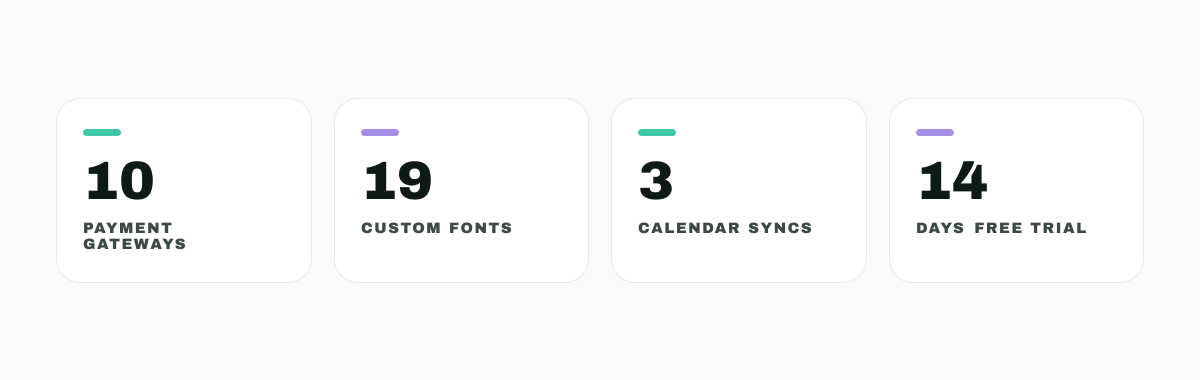
While most scheduling platforms limit you to standard integrations with Stripe or PayPal, MintCal supports ten separate payment providers built directly into the app.
Your buyers can pay using Stripe, PayPal, Paddle, Lemon Squeezy, Square, PayFast, Yoco, Paystack, Peach Payments, or DodoPayments.
Here's the thing.
Giving your buyer their local preferred gateway at checkout dramatically improves your booking conversion rates. If you serve clients across South Africa, West Africa, Europe, or North America, MintCal adapts to your audience instantly.
MintCal also replaces ugly default booking forms with a full mini-lander booking page builder. Each event type comes with its own customizable layout featuring 13 distinct drag-and-drop widgets, 19 curated typography choices, color gradients, and social proof elements.
Key Features
- 10 Native Payment Gateways: Support for global merchant-of-record providers, traditional processors, and regional African and European gateways.
- Mini-Lander Builder: Custom design controls for each event type to showcase testimonials, agendas, and video intros directly on the booking page.
- Unified Calendar Sync: Real-time two-way sync across Google Calendar, Outlook, and Apple Calendar simultaneously.
- Automated Sequences: Custom branded email notifications, confirmation flows, and follow-up emails without third-party tools.
- No Hidden Platform Surcharges: MintCal never takes a percentage cut of your transaction volume.
Pricing
MintCal offers a straightforward fixed subscription with a 14-day free trial. You can view full pricing details on our /pricing page.
2. Calendly
Calendly is one of the most widely used scheduling tools on the market. It offers reliable, basic payment collection for individual professionals and corporate teams.
Calendly connects with Stripe and PayPal to allow users to collect payments when a client books a meeting. You can set a fixed fee for an event type, charge for multi-session packages, or send payment links directly to clients.
See, Calendly works fine if you only need standard credit card processing via Stripe. However, its payment options are limited to those two providers, and you cannot customize the booking page layout beyond basic branding.
To learn how it compares in detail, check out our full /compare/calendly breakdown.
Pros
- Extremely reliable and familiar interface for corporate clients.
- Easy integration with popular CRM and web conferencing tools.
Cons
- Payments are restricted to Stripe and PayPal only.
- Payment collection is locked behind paid subscription tiers.
- Minimal design customization on the booking screen.
3. Cal.com
Cal.com is an open-source scheduling infrastructure platform that caters heavily to developers and tech-forward teams.
It allows users to connect Stripe and PayPal to collect upfront payments for booked events. Cal.com is notable for offering payment functionality on its free plan for individual users, making it a viable starter choice for solo developers.
Now, while Cal.com offers great developer flexibility and self-hosting options, non-technical users may find its configuration options overly complex compared to a visual mini-lander builder.
Read our comprehensive /compare/calcom review for a deeper dive.
Pros
- Free individual plan includes basic Stripe and PayPal payment acceptance.
- Self-hosted open-source version available for custom deployment.
Cons
- Gateway selection is limited compared to dedicated commerce tools.
- Setting up custom styling and complex logic requires technical comfort.
4. Acuity Scheduling
Acuity Scheduling, owned by Squarespace, is a mature booking platform built with service providers, salons, and health practitioners in mind.
Acuity supports Stripe, Square, and PayPal. It provides advanced commercial features such as taking partial deposits, accepting tips during checkout, offering subscriptions, and storing client payment details for future manual charges.
Plain and simple.
Acuity is strong for local appointment-based businesses. However, its user interface feels dated, and its design controls are limited if you want a modern landing page experience.
Compare features in detail at /compare/acuity.
Pros
- Supports upfront deposits, tips, and recurring memberships.
- Square integration allows for seamlessly bridged online and in-person payments.
Cons
- Higher monthly starting cost than most standalone schedulers.
- Booking pages look like traditional multi-step administrative forms.
5. TidyCal
TidyCal is a low-cost booking tool designed as a lightweight alternative for budget-conscious users.
It integrates with Stripe and PayPal to allow simple paid booking collection. TidyCal is popular due to its lifetime deal model available on AppSumo.
Here's the catch.
TidyCal charges a 1% platform fee on transactions processed on its free and standard lifetime plans. You have to upgrade to a higher tier to eliminate that additional cut on top of Stripe's own fees.
See our side-by-side comparison at /compare/tidycal.
Pros
- Very inexpensive entry price for casual users.
- Simple setup for basic paid standard time slots.
Cons
- Takes a 1% transaction surcharge on standard lifetime plans.
- Extremely basic presentation with zero landing page widgets or design flexibility.
6. SavvyCal
SavvyCal focuses on creating an intuitive booking experience for the invitee by letting them overlay their own calendar on top of yours.
It offers basic Stripe integration, allowing you to charge clients before they confirm a time slot on your schedule. SavvyCal is well-regarded for its clean design philosophy and personalized link features.
Look, SavvyCal is fantastic for user experience during calendar selection, but its payment options are strictly limited to Stripe, with no native support for PayPal, Paddle, or local regional gateways.
Explore our comparison at /compare/savvycal.
Pros
- Excellent calendar overlay feature for easy mutual availability checks.
- Clean, modern visual interface for buyers.
Cons
- Stripe is the only supported payment gateway.
- Lacks custom lander building features for sales conversion.
7. YouCanBookMe
YouCanBookMe is a long-standing scheduling tool built primarily for customer success teams, educators, and consultants.
It integrates directly with Stripe to allow users to collect fixed fees during the booking process. You can set prices based on duration or specific booking options chosen by the client.
However, YouCanBookMe does not support PayPal or alternative payment providers, restricting its usefulness for global audiences who lack credit card access.
Read our breakdown at /compare/youcanbookme.
Pros
- Strong password-protected and customizable form logic.
- Flexible duration-based pricing setups.
Cons
- Restricted to Stripe for payment handling.
- Interface design feels corporate and functional rather than high-converting.
8. SimplyBook.me
SimplyBook.me is an feature-rich booking system aimed at international service providers and multi-location businesses.
It supports a broad selection of payment gateways, including Stripe, PayPal, Square, Authorized.Net, and regional options like Alipay and Asiapay through its custom feature add-on library.
While SimplyBook.me provides wide payment support, setting it up can feel overwhelming. You have to navigate a complex dashboard of optional plugins and strict booking limits per plan.
Read our evaluation at /compare/simplybookme.
Pros
- Wide assortment of global payment gateways via add-on modules.
- Supports complex service enterprise features like point-of-sale integration.
Cons
- Interface is complex and non-intuitive to configure.
- Tiered plans enforce monthly booking caps.
9. Square Appointments
Square Appointments is a dedicated scheduling platform designed natively around the Square payment ecosystem.
If you operate a physical retail shop, medical practice, or personal service business that relies heavily on Square POS hardware, Square Appointments provides immediate, seamless sync between online booking fees and in-person checkout.
Know what I mean?
If you are already embedded in the Square ecosystem, it works well. But if you want to use Stripe, PayPal, or lower-cost digital merchant processors, Square Appointments locks you into their payment network.
Pros
- Native deep integration with Square POS hardware and merchant processing.
- Free tier available for single-location businesses.
Cons
- Zero support for third-party payment gateways like Stripe or PayPal.
- Limited utility for digital creators selling global consulting calls.
10. BookLikeABoss
BookLikeABoss is a landing-page-focused booking software designed specifically to sell services, physical products, and consultation sessions.
It allows you to create comprehensive landing pages that feature videos, photos, and client reviews alongside integrated payment options via Stripe and PayPal.
While BookLikeABoss understands the need for landing page presentation, its design templates are somewhat rigid, and payment processing is strictly confined to traditional credit card processors.
Pros
- Combines landing page elements directly with calendar forms.
- Supports digital downloads and product sales alongside bookings.
Cons
- Gateway support is limited to Stripe and PayPal.
- Design controls are restrictive compared to modern page builders.
How to Set Up Paid Bookings in MintCal
Setting up a high-converting paid booking page with MintCal takes less than five minutes.
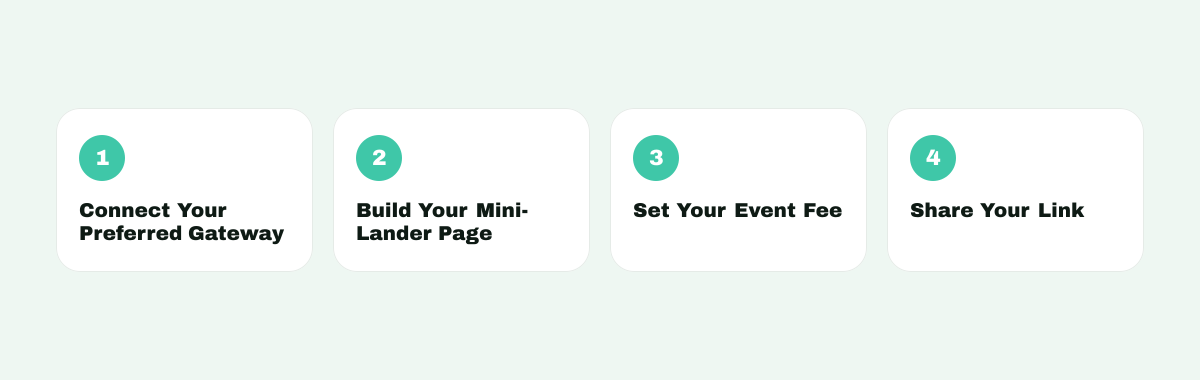
Follow these quick steps to start collecting fees upfront:
- Connect Your Preferred Gateway: Navigate to settings and authenticate your chosen payment provider (Stripe, PayPal, Paddle, Lemon Squeezy, or regional options).
- Build Your Mini-Lander Page: Open the event editor and select a custom template. Customize your layout using widgets, custom fonts, and testimonials on our /templates page.
- Set Your Event Fee: Define your fixed price, currency, and payment terms directly inside the event parameters on our /features dashboard.
- Share Your Link: Copy your custom booking link or embed the widget on your website to start accepting paid appointments automatically.
The Final Verdict
If you only need basic credit card billing for domestic clients, tools like Calendly or Cal.com are serviceable options.

But if you sell paid consultations, strategy calls, or coaching packages globally, you cannot afford to drop buyers at a generic form or force them into a single payment processor.
MintCal gives you ten integrated payment gateways, zero hidden platform surcharges, and a customizable mini-lander booking page that converts visitors into paid clients.
Stop chasing unpaid invoices.
Start accepting paid bookings automatically today.
Frequently Asked Questions
Why should I require payment at the time of booking?
Requiring upfront payment eliminates late invoices, protects your working calendar from non-committed prospects, and slashes appointment no-show rates to nearly zero.
Does MintCal take a fee from my booking payments?
No. MintCal charges zero platform transaction fees on your bookings. You only pay standard processing fees charged directly by your chosen payment gateway.
Can I offer different payment gateways on different booking links?
Yes. With MintCal, you can configure individual payment options across different event types, allowing you to tailor gateways and currencies for specific regions or client segments.
What payment gateways does MintCal support?
MintCal supports ten built-in payment providers: Stripe, PayPal, Paddle, Lemon Squeezy, Square, PayFast, Yoco, Paystack, Peach Payments, and DodoPayments.