More of you.
In every detail.
Start with a template. Change the parts that make it personal.
AaAaAa
Set the feeling.
Your fonts, colours, backgrounds and corners. Bold, quiet, playful—make it feel right.
19 fonts · Custom colours · PatternsYour introductionWhat clients sayQuestions, answered
Tell your story.
Add your introduction, video, testimonials and FAQs. Give people a feel for who they’re booking.
13 profile widgets · Your own contentIntroductionSessions
About your work
Find your flow.
Arrange your page in columns, move your content, and give each event its own context.
5 column layouts · Per-event contentBeyond the first impressionThe booking flow
belongs to your brand, too.
Colours and backgrounds carry into the calendar, questions and booking details. Event pages can add their own FAQs and supporting content.
Explore pages, booking and emails ↓ 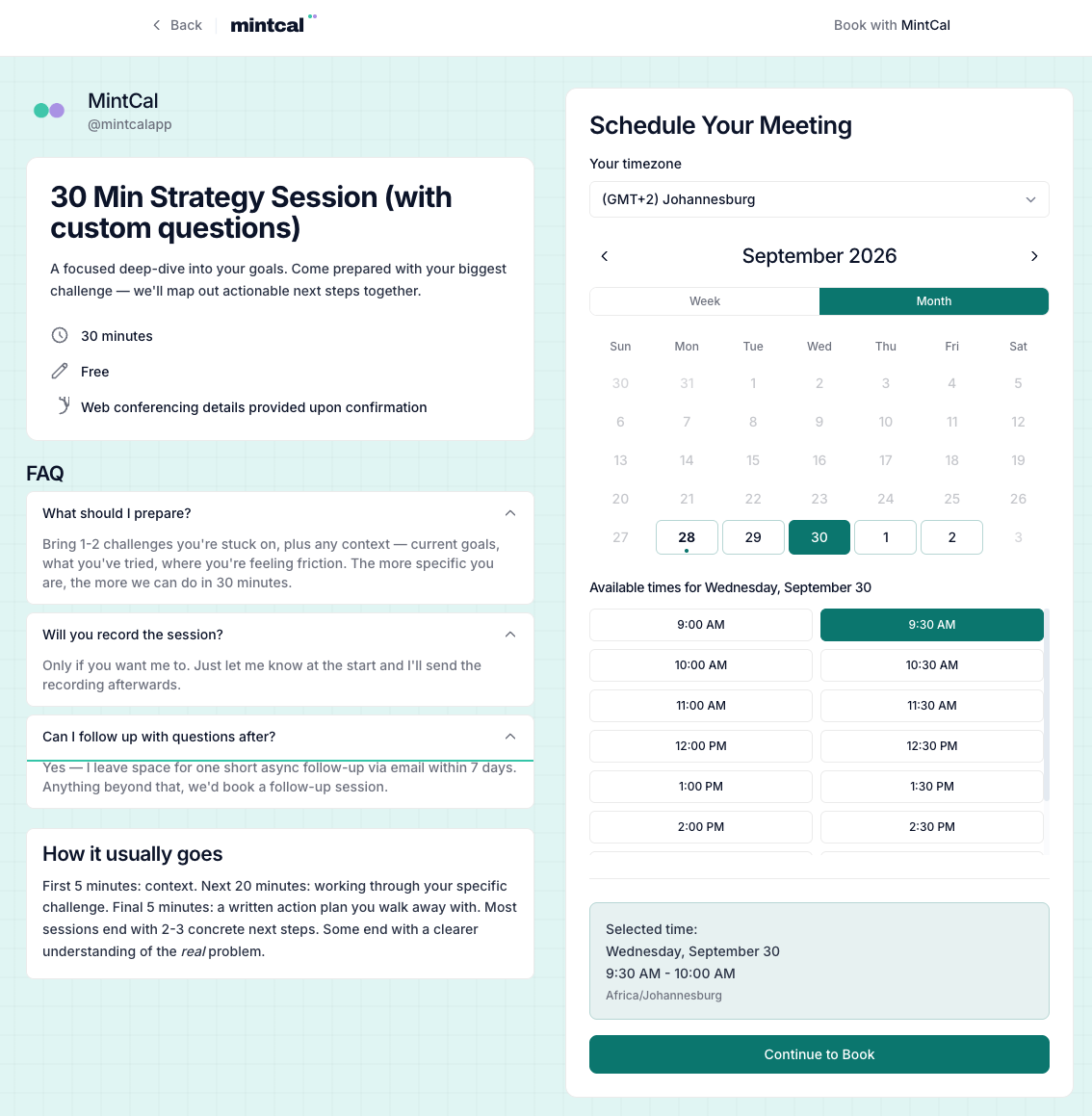 MintCal demo: event FAQs alongside the booking calendar. View full screenshot ↗
The details,
when you need them.
Open a category or search for something specific.
Six categories. Explore at your own pace.
01Booking pages & branding
Fonts, colours, layouts and the content that makes it yours.
- 13 profile-page widgets, including video, testimonials and FAQs
- Five column layouts with drag-and-drop widgets
- Six industry templates and saved personal templates
- 19 fonts, separate heading and body typography
- Colours, gradients, patterns and per-widget styling
- Six content widget types on individual event pages
- Search titles, descriptions and mobile preview
- Remove “Powered by MintCal” with an active paid subscription
02Scheduling & availability
Availability, calendar sync and boundaries around your time.
- Unlimited event types, with categories and duplication
- Weekly availability, date overrides and per-event time blocks
- Google Calendar and Outlook sync with cross-calendar conflict checks
- Timezone detection and configurable time-slot intervals
- Buffers, minimum notice and future booking windows
- Daily, weekly, monthly and per-client booking limits
- Multiple session durations with optional prices
- Google Meet, Zoom, phone, in-person and custom meeting locations
- One-click rescheduling and cancellation links
- Private links and custom redirects after booking
03Screening & coordination
Questions, routing, approvals and group polls.
- Custom booking questions with seven field types
- Conditional routing to an event, URL or message
- Screening before clients choose a calendar slot
- Manual approval with approve and decline actions
- Group polls with public voting and optional auto-book on close
- Manual bookings on behalf of a client
04Paid sessions
Providers, prices, coupons and payment tracking.
- 10 providers: Stripe, PayPal, DodoPayments, Lemon Squeezy, Paddle, PayFast, Yoco, Peach Payments, Paystack and Square
- Provider selection per event; client choice when several are enabled
- Supported currency selection based on your providers
- Percentage and fixed-amount coupon codes
- Coupon expiry dates, usage limits and one-per-email restrictions
- Payment status and revenue by provider in analytics
- No MintCal commission; provider processing fees apply
05Emails & client records
Your voice in their inbox. Their history at your fingertips.
- Branded attendee confirmations, preparation emails, reminders and follow-ups
- Per-event rich-text email editing, previews and test sends
- Up to five custom reminders per event with configurable timing
- Client search, booking history, private notes and CSV export
- Client ban and unban, plus no-show tracking
- Import client and appointment CSVs from Calendly or Acuity
- Meeting-note imports from Fathom, Fireflies and tl;dv
- Fathom auto-import; manual imports for Fireflies and tl;dv
- Choose a provider summary or MintCal AI summary, then email a recap manually
06Insights, embedding & account controls
Performance, your existing website and your account controls.
- Booking trends, popular-time heatmap and event performance
- Page-view-to-booking conversion and revenue statistics
- Filtered booking CSV exports
- Embeddable booking widget for your existing website
- Two-factor authentication with backup codes
- Account data export and account deletion
No matches. Try another term or clear your search.